Case Study 003
TCPA: In-Browser Analytics
Try it liveWhy this was created: The TCPA Litigation Explorer
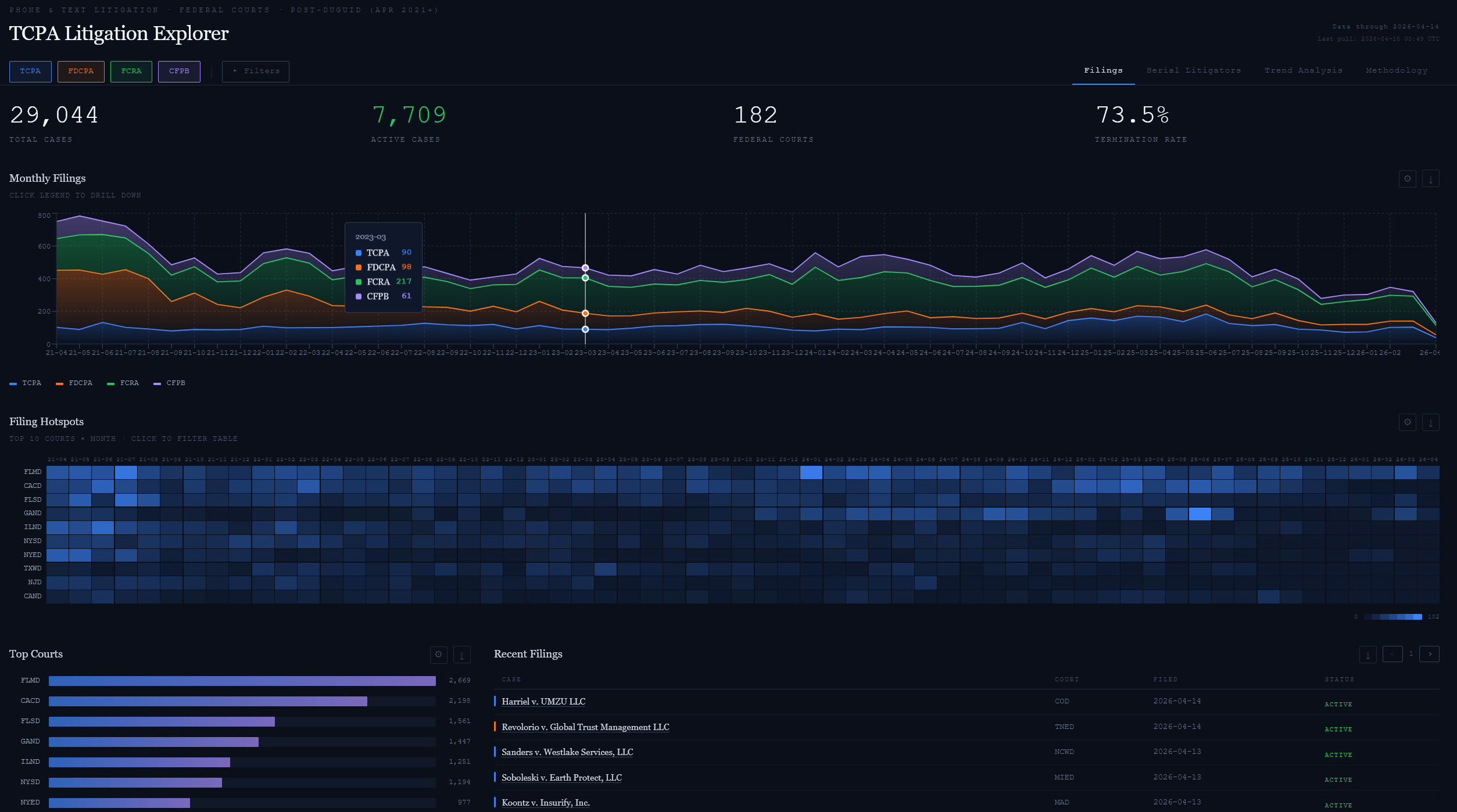
The TCPA Litigation Visualizer is a dashboard for tracking trends in the consumer communications space. This was created to inform a series of blog posts and articles I was looking to publish about data in the TCPA litigation space. I was having trouble finding reliable sources of information and a way to visualize and explore the data trends, so I decided to build one myself using MotherDuck and DuckDB-WASM.
The Problem: Post-Duguid TCPA Trend Analysis
Consumer-protection litigation is a moving target, and the move that matters most happened on April 1, 2021. That is when the Supreme Court handed down Facebook v. Duguid, narrowing the definition of an automatic telephone dialing system (ATDS) under the Telephone Consumer Protection Act. After Duguid, a device had to use a random-or-sequential number generator to qualify — predictive dialers working from stored lists, which had powered most TCPA suits for a decade, largely fell outside the statute. The plaintiffs' bar responded by pivoting: fewer ATDS claims, more Do-Not-Call (DNC) and pre-recorded-voice claims, and heavier use of state Mini-TCPA statutes where the federal ceiling no longer held.
That pivot is the story the numbers should tell, but the numbers are hard to see. The Consumer Litigation Visualizer was built to make it legible — a trend tracker for the four statutes that shape consumer privacy and credit litigation: TCPA (47 U.S.C. § 227), FDCPA (15 U.S.C. § 1692), FCRA (15 U.S.C. § 1681), and CFPB enforcement actions. All four share the post-Duguid window as a coherent analytical period, and together they describe how the regulatory floor for consumer communication gets built in practice.
Data comes from the CourtListener REST API, the public interface to the Free Law Project's RECAP archive of federal PACER filings. That scope cuts two ways. On one hand, it gives clean, authoritative docket coverage across every federal district court — rate-limited at about 5,000 authenticated requests per hour, pagination by cursor, and no scraping needed. On the other hand, it is federal-only. State Mini-TCPAs — Florida's FTSA, Washington's WADAD, Oklahoma's TSHA — are the post-Duguid escape valve the plaintiffs' bar uses most, and they live in state dockets that RECAP does not index. That blind spot is documented on the visualizer's Methodology tab rather than hidden, because an honest trend chart names its gaps.
Getting from a search API to a classified case table is three steps, not one. First, ingest: the pipeline queries CourtListener for each statute's keywords — for TCPA that means "TCPA" OR "47 U.S.C. § 227" and variants — then post-filters false positives using Nature-of-Suit and cause codes. The broad keyword sweep catches roughly 18% more cases than a narrow Nature-of-Suit query, but it also pulls in ADA, insurance, and contract cases where "TCPA" appears incidentally. The filter rejects those; rows with blank NOS/cause are kept under the benefit of the doubt because CourtListener has not yet indexed them.
Second, keyword-classify: for each surviving case, a document-level search over the complaint text (CourtListener's type=rd search mode) decides whether the claim is about SMS, voice, or fax, and whether the legal theory is ATDS, DNC, or both. Third, PDF-extract: when keyword search comes back inconclusive, the pipeline downloads the actual complaint PDF from RECAP's CDN (no auth, no rate limit), runs it through pdfplumber, and classifies from the full text. Plaintiff names come out of the API's party array plus a "filed by" regex over the complaint head; class-action flags come out of case-name patterns and complaint body text. The combined pipeline resolves plaintiff identity for about 99% of cases.
The result is a table with roughly 29,000 rows covering April 2021 through the present, classified into the axes that matter for post-Duguid analysis: claim_type (SMS / Voice / Fax / Unknown), legal_theory (ATDS / DNC / Both / Unknown), is_class_action, plus the usual docket metadata. Unknowns are not silently dropped — they live in a sibling table, cases_unclassified, and the dashboard exposes an "Include unclassified" toggle that unions them back in with a tooltip that explains what the user just changed. Trend analysis only works if the sample frame is visible; the visualizer treats that as a UX problem, not a methodology footnote.
MotherDuck Dives: Dashboards as Code
The first home for this data was a MotherDuck Dive — a React dashboard that lives inside MotherDuck, queries MotherDuck-hosted tables live, and ships as a single shareable URL. A Dive is BI-as-code: you author it in TSX, commit it to the database the way you would commit a migration, and let teammates open it without exporting a CSV or standing up a BI tenant. Compared to Tableau or Power BI, the trade-off is explicit. You lose the drag-and-drop authoring surface and the ecosystem of pre-built chart packs. You gain version control, composable queries, and the ability to write exactly the interaction model the narrative needs — toggles that mean something, not generic slicer panes.
For the Consumer Litigation Visualizer, that meant five tabs, each answering one question: Filings (how many cases, where, filtered by statute pills for TCPA / FDCPA / FCRA / CFPB), Serial Litigators (who files repeatedly — the long tail of named plaintiffs that shows up in the data), Financial Exposure (penalties and class-action indicators), Trend Analysis (MTD / YTD presets with snapshot panels that break down claim type, legal theory, and top plaintiffs for the selected window), and Methodology (the data-source and classification documentation that every honest trend dashboard owes its readers).
The interaction that earns its keep is the "Include unclassified" toggle. About 171 TCPA cases in the post-Duguid window could not be classified by either keyword search or PDF extraction — the complaints were sealed, the PDFs unavailable, or the allegations ambiguous. Hiding them would be tidy; unioning them back in with a tooltip is honest. A Dive makes that a one-line UNION ALL against a sibling table, wired to a checkbox whose label explains itself. A traditional BI tool treats it as a filter; a dashboard-as-code treats it as a methodology control.
The underlying queries are what you'd expect — DuckDB SQL with window functions, CASE classification, and a generated month spine for time series:
-- Top defendants over the post-Duguid window
-- excerpt from .dive-preview/src/dive.tsx
WITH filtered AS (
SELECT
CASE WHEN case_name LIKE '% v. %'
THEN split_part(case_name, ' v. ', 2)
ELSE case_name END AS defendant,
COUNT(*) AS cases,
COUNT(DISTINCT plaintiff) AS unique_plaintiffs,
COUNT(DISTINCT court) AS courts
FROM cases
WHERE date_filed >= '2021-04-01'
GROUP BY 1
)
SELECT * FROM filtered ORDER BY cases DESC LIMIT 25;
The quiet feature is dual-execution. The same React component that runs the Dive against live MotherDuck data can also run against in-browser DuckDB-WASM with only the useSQLQuery provider swapped out. That is the architectural hinge for the next section: the Dive is the source of truth, but it is not the final published form. MotherDuck Dives docs.
MotherDuck MCP: Conversational ETL
The three-step pipeline described above — ingest, keyword-classify, PDF-extract — did not arrive fully-formed. Earlier versions of it lived as a batch script that processed cases in a blind loop, surfacing errors only after the run finished. Each debug round meant rerunning the whole pipeline against a MotherDuck database you could not see into from a code editor. The MotherDuck MCP server collapsed that loop.
MCP — the Model Context Protocol — lets an AI agent (Claude, Cursor, the MotherDuck chat surface) execute SQL directly against the database while you are having a conversation about the data. Schema exploration stops being a context-switch: FROM cases LIMIT 5 becomes a chat prompt. You can ask the agent "why do these 200 cases have claim_type = 'Unknown'?" and watch it write the diagnostic query, run it, and revise the classification logic — all without leaving the thread. The three-step pipeline became a conversational artifact: draft a classification rule, run it against a slice, look at the misses, refine. The ETL code evolved on paper; the ETL iteration loop evolved in chat.
The Dives themselves often follow the same build path. The MotherDuck surface includes AI authoring that lets you describe a dashboard in natural language and produces the TSX component against your actual schema. That closes a loop that used to need at least three handoffs: "describe the data" → "write the queries" → "wire them to charts." With the MCP server plumbed into the editor, all three happen in the same conversation, grounded against a live database rather than a sample extract.
The MotherDuck MCP server ships in two flavors: a self-hosted local version run behind your own credentials, and a remote, MotherDuck-managed server that went GA in December 2025. For this project the self-hosted path was enough — one entry in the editor's MCP config, one MOTHERDUCK_TOKEN, and the agent had schema-aware access. See motherduckdb/mcp-server-motherduck for the reference implementation.
DuckDB-WASM: Zero-Backend Publishing
The MotherDuck Dive is the source of truth, but it is not the form a reader opens on their phone. A Dive requires a MotherDuck account — reasonable for a team, a wall for anyone clicking from a case-study page. The solution is an architectural flip: take the same React component that powers the Dive, point it at a snapshot of the data baked into the page, and serve the whole thing as a static file. That is the /tcpa visualizer shipped on this site.
At build time, a small Python script connects to MotherDuck and runs COPY (SELECT * FROM cases) TO 'cases.parquet' (FORMAT PARQUET, COMPRESSION ZSTD). The 29,000-row cases table compresses down to roughly 2–3 MB; the 171-row cases_unclassified table lands under a kilobyte. Vite bundles both Parquet files into the public directory alongside a React build. At runtime, the browser downloads them, spins up DuckDB-WASM (~4 MB, cached after first visit), and hands the connection to the same dashboard code that runs against MotherDuck in production. Queries execute locally in 5–50 ms against in-memory tables; initial load is roughly 3–5 seconds on a cold cache and near-instant afterwards.
The pivot point is how DuckDB-WASM consumes the Parquet files. The provider fetches each file as an ArrayBuffer, registers it with the WASM filesystem, and creates an in-memory table that mirrors the MotherDuck schema:
// static-site/src/duckdb-provider.tsx (excerpt)
for (const pf of parquetFiles) {
const resp = await fetch(pf.url);
const buf = await resp.arrayBuffer();
await db.registerFileBuffer(
pf.tableName + ".parquet",
new Uint8Array(buf),
);
await conn.query(
`CREATE TABLE "${pf.tableName}" AS SELECT * FROM read_parquet('${pf.tableName}.parquet')`,
);
}
The production Dive and the static bundle share every component. Only the useSQLQuery provider differs: the static version rewrites fully-qualified table references such as "consumer_litigation"."main"."cases" down to unqualified cases at query time, so the same SELECT statements written against MotherDuck run unchanged against the in-memory DuckDB-WASM instance. One set of charts, two data sources — the one the project team sees, with live data and sub-second writes, and the one the public sees, frozen to the build-time snapshot and free to host.
DuckDB-WASM ships its threaded WASM build behind two HTTP headers that are usually an afterthought: Cross-Origin-Opener-Policy: same-origin and Cross-Origin-Embedder-Policy: require-corp. Together they unlock SharedArrayBuffer, which is how the threaded WASM worker actually does useful work. Without those headers the engine falls back to the single-threaded build and query latency climbs; with them, the library performs like a local DuckDB process. The deployment sets both headers on every response under /tcpa/* at the CDN layer, so the visualizer works from any modern browser with no user configuration.
The economic argument writes itself. The Dive needs MotherDuck seats for every reader; the static bundle needs no server, no API keys, no authentication, and sits on the same CDN as the rest of this site. Data freshness is the trade-off — MotherDuck is live, the static snapshot is frozen until the next export — but that is exactly the right contract for a case study. A reader does not need real-time TCPA filings. They need a trustworthy snapshot they can explore for five minutes without creating an account. When the underlying legal landscape shifts again, a rebuild-and-redeploy cycle picks up the new data; until then, the static site runs for as close to zero marginal cost as public infrastructure allows. See duckdb/duckdb-wasm for the engine.
What This Stack Lets You Ship
A traditional BI tool gives you a dashboard behind a login. This stack gives you a dashboard as a file. The post-Duguid landscape will keep moving — new state Mini-TCPAs, new circuit splits, another pivot in the plaintiffs' bar's playbook — and the tool that reads it needs to outlive the snapshot it was built against. A MotherDuck Dive carries the live data for the team that maintains the pipeline; a DuckDB-WASM static export carries a trustworthy, reproducible view of that data to anyone with a URL. Two audiences, one codebase, zero marginal cost per reader. That is the shipping form the problem needed.